

Garmin Connect Essentials, what is it, how to access it
Garmin has started rolling out a new Essentials section in Garmin Connect alongside today’s CIRQA launch, but it has not yet reached every phone. The good news is that anyone impatient can already switch it on through the Garmin Connect web dashboard and see exactly how it works.
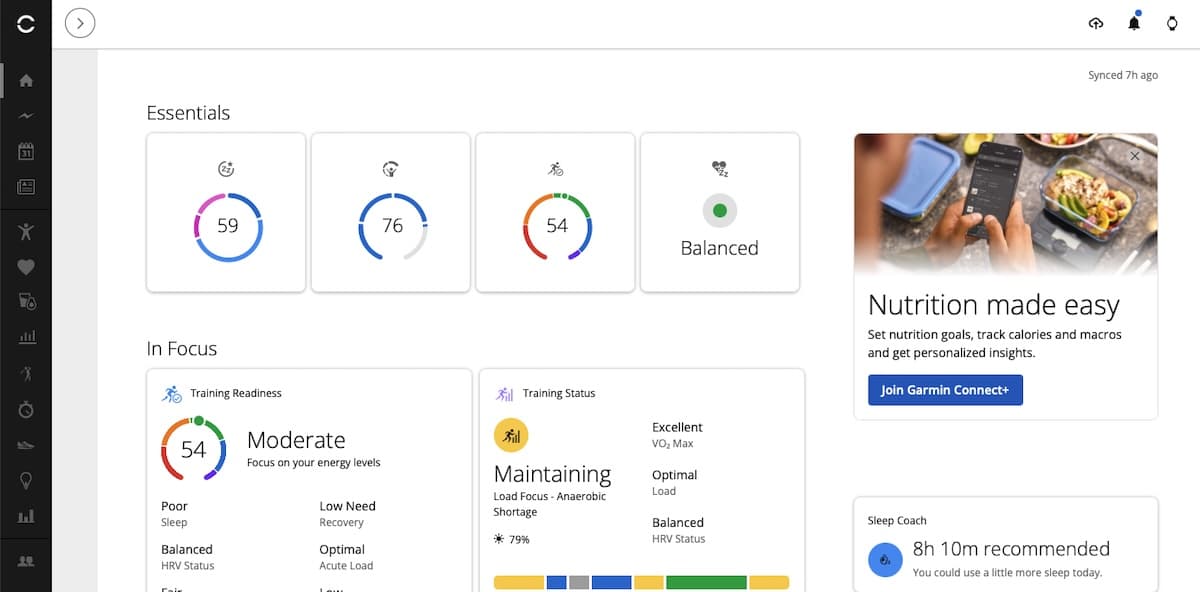
The new section sits at the top of the Garmin Connect home screen and gives four recovery and health metrics their own large cards. These are Sleep Score, Body Battery, Training Readiness and HRV Status.
Each card shows the latest result without requiring much digging. Selecting one opens the corresponding page with the more detailed trends, explanations and historical data Garmin already provides elsewhere in Connect.
The mobile rollout is still uneven
Essentials is appearing with Garmin Connect version 5.27 on both Android and iOS, although availability appears to depend on whether the latest app release has reached your account and region. Once installed, the setting can be found under Settings and then Home Settings.
I checked both platforms in the UK, and version 5.27 was not yet available on either of them at the time of writing. That is fairly normal for a staged app rollout, but it means some users may see screenshots of Essentials before the update reaches their own phone.
There is no need to keep refreshing the app stores, though. The same layout has already appeared in Garmin Connect on the web, where it can be enabled immediately.
How to enable Garmin Connect Essentials on the web
Sign in to the Garmin Connect website and open Settings. Select Home Settings, then switch on the Essentials toggle near the top of the page.
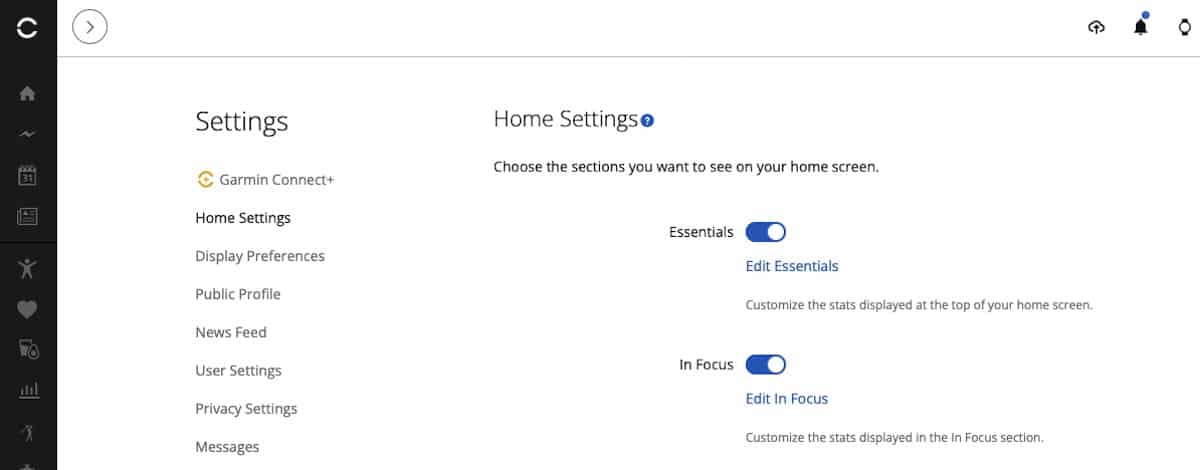
Return to the home screen and the four new cards should appear above the existing In Focus section. There is also an Edit Essentials option for changing the stats displayed within the row.
Garmin CIRQA has no display, so nearly every useful interaction happens after opening Garmin Connect. It is probably why the company saw the need to display a few headline stats right at the outset.
Garmin officially launched CIRQA today as its first screenless smart band, with continuous health tracking, up to 10 days of battery life and no Garmin subscription required. It is similar to Whoop in looks, but has a physical button and multi-functional LED. Check out our overview on how it compares to the Fitbit Air.
Essentials is a small addition, but it gives the new device a more obvious landing point inside Garmin Connect. Mobile access should follow as version 5.27 spreads more widely, while the web dashboard provides an easy preview in the meantime.
Don’t miss the latest from Gadgets & Wearables
Subscribe to our monthly newsletter and check out our YouTube channel.
You can also follow Gadgets & Wearables on Google News and add us as a preferred source in Google Search.

