
Pixel Watch 5 strength training isn’t here yet, but we now know how it works
The Pixel Watch 5 has been available for roughly seven weeks, yet one of its most useful fitness features is still missing. Google’s new advanced strength training mode remains labeled “coming soon,” though a demo offers a solid preview of how it’s meant to function.
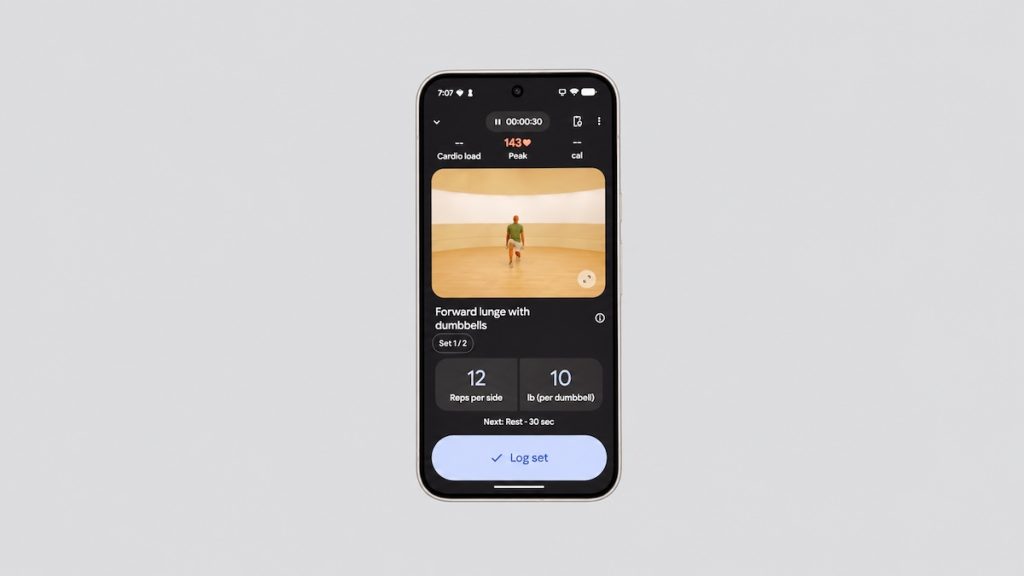
This isn’t simply another workout mode with a timer and heart-rate display. Google is developing a full-fledged strength-training system that begins with Health Coach on your phone and then transfers the workout to the watch when you’re ready to begin.
Google announced the feature alongside Pixel Watch 5 in August, and we covered it in our Pixel Watch 5 vs Pixel Watch 4 comparison. Almost two months later, Google’s own Pixel Watch pages still label advanced strength training and the custom workout builder as “Coming soon.”
Health Coach builds the workout for you
The starting point is Google Health Coach rather than you sitting there manually building a routine exercise by exercise. In Google’s demo, the user requests a 30-minute workout suitable for a hotel gym using only dumbbells. The coach then generates the entire session, complete with exercises, sets, reps and weights.
It goes beyond that in terms of personalization. In the demo, Health Coach recalls that the user has a shoulder injury and selects exercises accordingly.
Health Coach isn’t your only option, either. According to Google’s current description, you’ll also be able to create strength sessions manually, selecting the exercises, exact reps, weights and rest timers.
Once the workout is set, tapping start on the phone also launches the session on the Pixel Watch 5. After that, the phone can stay in your pocket.
The watch becomes your gym guide
During the workout, the Pixel Watch 5 displays the exercise you’re meant to be doing, along with form guidance and instructions on how to perform it correctly. You can see the prescribed reps and weight, while live heart rate stays visible throughout the session.
You can also preview what’s coming up next. If the next machine or piece of equipment is taken, the interface lets you switch to a different exercise instead of having to halt the routine and reorganize everything on your phone.
Google’s own product materials confirm that workouts can be adjusted directly from the wrist, including changing reps and reordering exercises when equipment is occupied.
The overall setup feels far more like a dedicated gym app than the traditional smartwatch approach to strength training. Rather than just hitting start on “Weights” and logging heart rate for 45 minutes, the watch knows which workout you’re following and walks you through it.
Still waiting for the rollout
Pixel Watch 5 has been around since last August with no launch of the feature in sight. Google hasn’t missed a specific promised release date, though, as it originally described the feature simply as coming soon, while some regional pages say it will arrive later in 2026.
When it does arrive, it should give Pixel Watch 5 a much better answer to people who spend more time lifting weights than running. The demo suggests it could be one of the watch’s better fitness additions once Google finally switches it on.
Don’t miss the latest from Gadgets & Wearables
Subscribe to our monthly newsletter and check out our YouTube channel.
You can also follow Gadgets & Wearables on Google News and add us as a preferred source in Google Search.

