

watchOS 27 is out today, here’s when you can download it
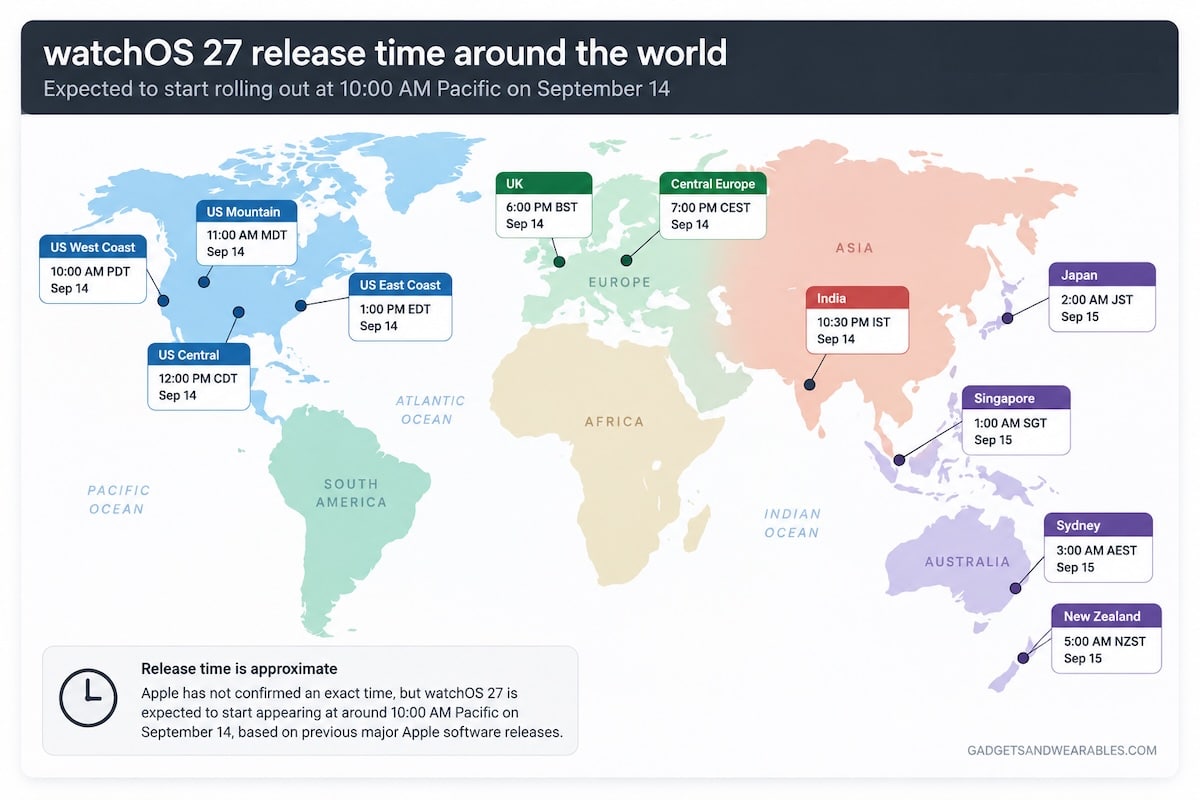
watchOS 27 starts rolling out today, with the update expected to begin appearing at around 10 AM Pacific. It brings Siri AI, Workout Buddy upgrades, a new app grid and a bunch of smaller changes to compatible Apple Watches. Just don’t expect everything Apple showed last week to suddenly appear on an older watch.
If you have a recent Apple Watch, today is basically software update day. Apple first showed us watchOS 27 at WWDC back in June, but that was the preview. September 14 is when the finished update starts reaching regular users.
Which Apple Watches get watchOS 27
You need an Apple Watch Series 9, Series 10, Series 11 or Series 12. Apple Watch Ultra 2, Ultra 3 and Ultra 4 are also supported, along with Apple Watch SE 3.
That means Series 8 and anything older are out. The original Apple Watch Ultra is also left behind, even though it is hardly ancient by smartwatch standards.
Your iPhone matters as well. Apple says watchOS 27 requires an iPhone 11 or later, or an iPhone SE 2nd generation or later, running iOS 27. So update the iPhone first if you are planning to install watchOS 27 today.
The actual installation process is the familiar one. Keep the Apple Watch at least 50 percent charged and on its charger, make sure the iPhone is connected to Wi-Fi, then open the Watch app and head to General and Software Update. You can also check directly from the watch under Settings, General and Software Update.
If the update does not appear immediately, there is not necessarily anything wrong. September 14 is the release date, but availability can take a little time to reach every device.
What you can actually try today
The most obvious change is Siri AI. Apple says the new version of Siri is rolling out in English with watchOS 27, bringing more natural conversations, broader knowledge and the ability to use personal context. There is also a dedicated Siri app where previous conversations can be picked up again.
The app grid has also changed. It can now surface Siri-suggested apps based on what you use regularly and what you have opened recently, which should make the grid a little less dependent on remembering where Apple decided to put every tiny circular icon.
Smart Stack gets more attention as well. Apple has added a single-tap gesture for opening a highlighted widget, while new contextual suggestions can surface things such as a parked car location or a reminder linked to someone’s birthday.
Workout Buddy has been expanded too. It can use more of your fitness history when generating spoken feedback, and it can now work without the iPhone physically nearby. You still need a paired Apple Intelligence-capable iPhone, Bluetooth headphones and either Wi-Fi or cellular connectivity when leaving the phone behind.
Treadmill users get a less glamorous but potentially more useful upgrade. Apple says new machine-learning models improve indoor walking and running distance estimates from the start of a workout, rather than relying as heavily on previous outdoor calibration.
There are smaller changes scattered around the system as well. Find My gets a more map-focused interface, Wallet can store custom QR code and barcode passes, Smart Stack suggestions are more proactive, and Cycle Tracking adds perimenopause and menopause support.
Readiness and the new HRV tracking are different
There is one important catch. Installing watchOS 27 on an older watch does not suddenly give you Readiness or the new higher-frequency HRV tracking. As we covered in our look at why older Apple Watches miss out on Readiness, those features are tied to Series 12 and Ultra 4 hardware.
The new watches can check heart rate in the background every five seconds and HRV as often as every five minutes. That extra data feeds into Readiness, while Apple has also added Recovery HRV alongside Overall HRV. We explain the difference between the two HRV measurements here.
So a Series 11 running watchOS 27 gets the new software features, but not the new health-sensing setup. For that, you need Series 12 or Ultra 4.
Don’t miss the latest from Gadgets & Wearables
Subscribe to our monthly newsletter and check out our YouTube channel.
You can also follow Gadgets & Wearables on Google News and add us as a preferred source in Google Search.

