

Acemate adds AI Shot Highlights to turn training sessions into videos
Acemate has rolled out AI Shot Highlights in version 2.3.0 of its tennis app, combining phone-recorded video with the shot data collected during a training session. It can automatically find individual shots and create a highlight reel with overlays including skeletal tracking, ball speed, net clearance and shot placement.
I have spent a lot of time with both the Acemate S10 and the newer S10 Pro, and both machines already collect plenty of data during a session. Version 2.3.0 now connects some of that data directly to video of your strokes.

Your phone records the session
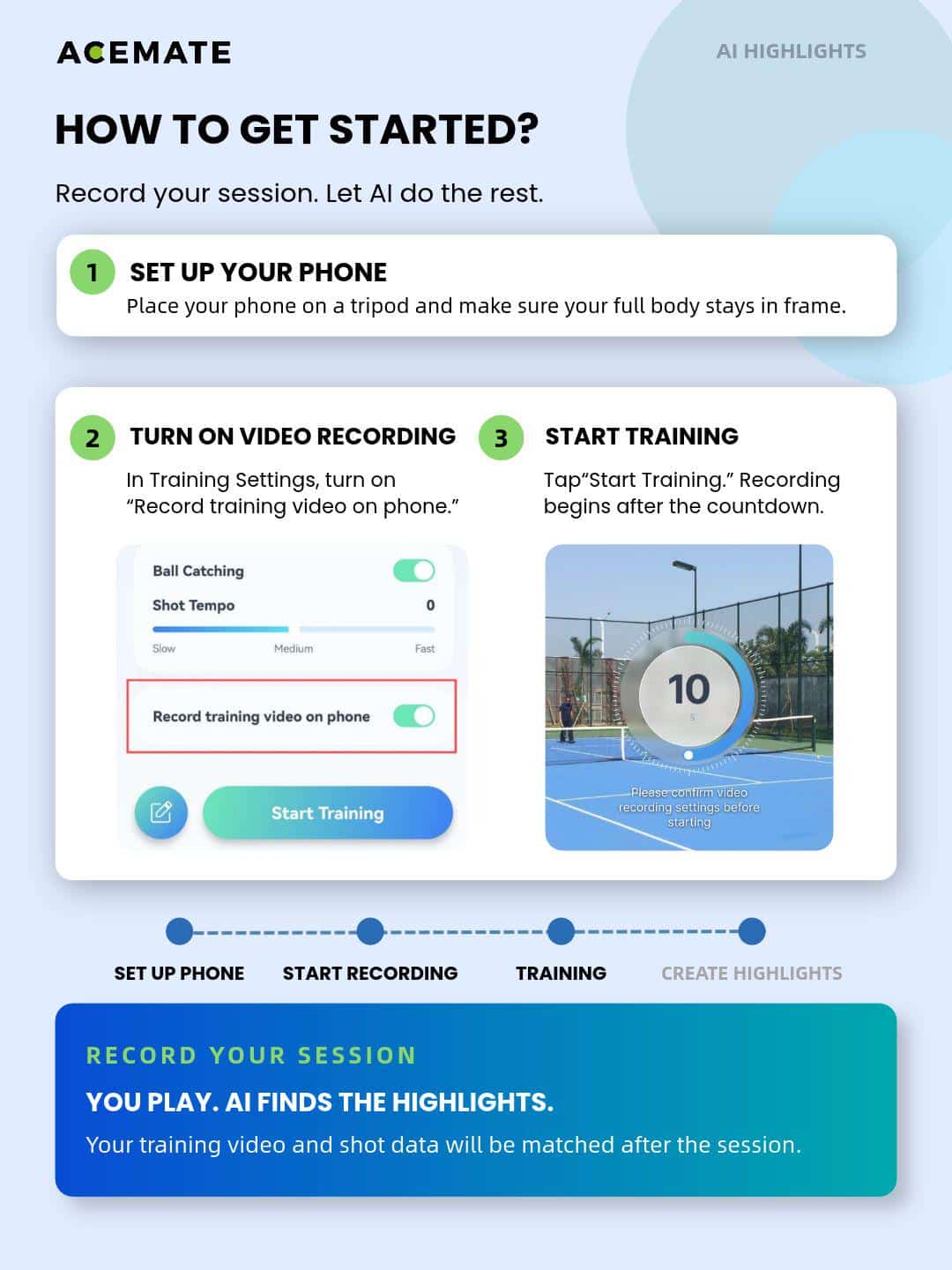
The system does not use the cameras built into the S10 or S10 Pro to film you. Instead, you place your smartphone on a tripod with your full body in frame and enable “Record training video on phone” inside Training Settings.
Start a normal training session and recording begins after the countdown. When the session ends, Acemate matches the phone footage with the shot data collected by the robot.
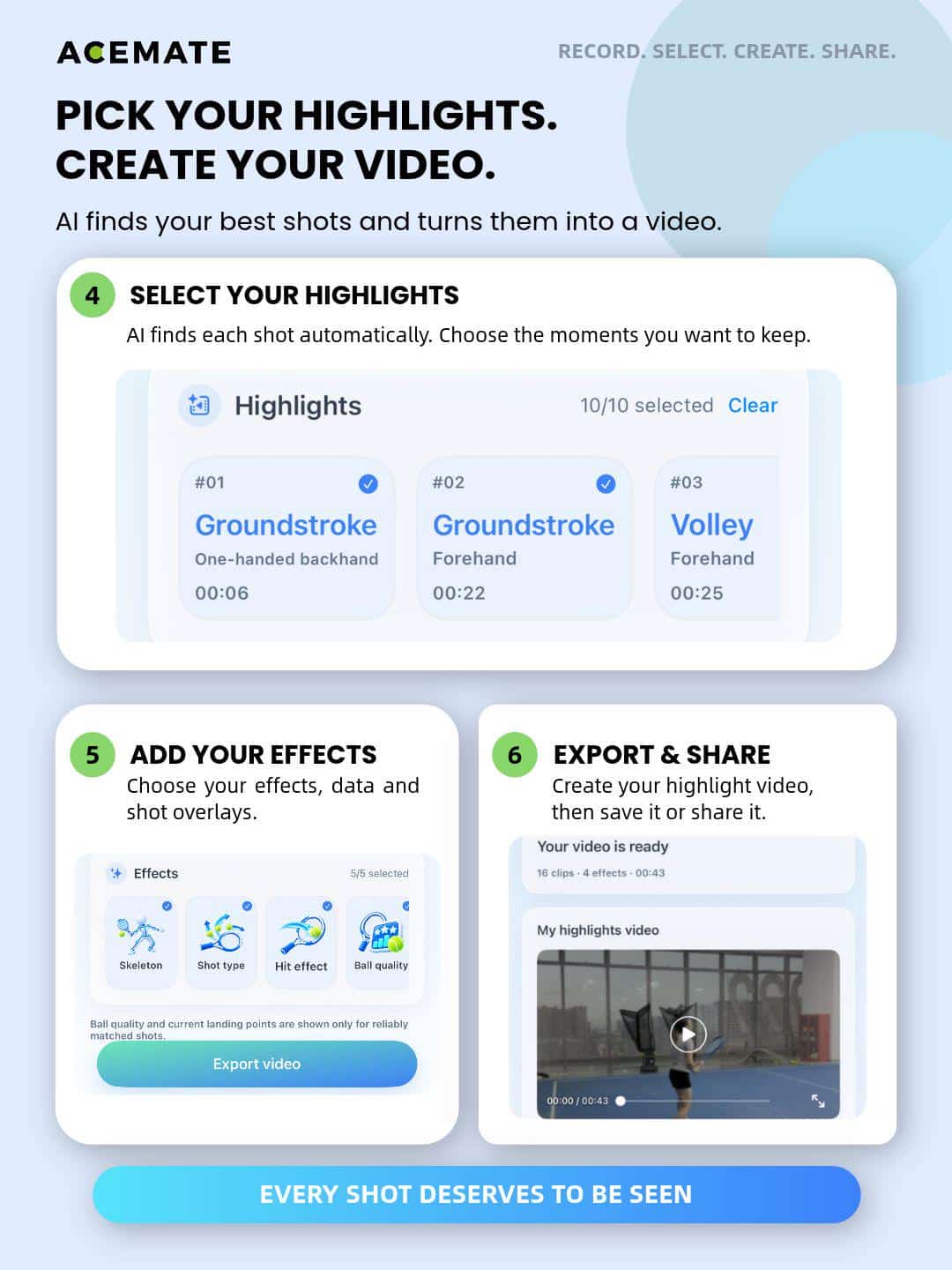
You then open AI Highlights from Training Records and let the app analyse the session. Acemate breaks the video into individual shots and identifies examples such as forehand groundstrokes, one-handed backhands and volleys.

The overlays are the useful bit
The app can add skeletal tracking, shot type, visual hit effects, ball speed, net clearance, ball quality and shot placement information to the finished video. Acemate notes that some data only appears when it can reliably match the information to the relevant shot.
When I reviewed the S10 and S10 Pro, I found the raw session data more useful than some of the broader AI coaching feedback. Shot maps, ball speed and net clearance give you something concrete to look at after a session.
AI Shot Highlights puts that information next to the stroke that produced it. If a forehand lands short, for example, you can see the actual swing and the resulting shot information together rather than moving between separate screens.
The skeletal overlay also looks interesting, although Acemate describes it as skeletal tracking rather than full biomechanical analysis. I would therefore treat it as a visual aid rather than expect it to diagnose technical problems with your stroke.
It works with the broader Acemate system
The new feature works on both generations of the device. So regardless whether you have the S10 or Pro version of the same, you can access this feature.
The company’s Black Friday offers are currently live. The S10 is down from $2,499 to $1,799, while the S10 Pro has dropped from $2,999 to $2,499. My code G&W01 takes another $150 off either machine through November 30.
At those prices, I would still choose the S10 for most recreational players. The Pro is the better option if you specifically want more pace, stronger spin and additional headroom for harder sessions.
Don’t miss the latest from Gadgets & Wearables
Subscribe to our monthly newsletter and check out our YouTube channel.
You can also follow Gadgets & Wearables on Google News and add us as a preferred source in Google Search.

