

Garmin’s new voice feature is taking a serious toll on battery life
Garmin’s new “OK Garmin” voice feature is turning out to be quite a battery hog. Owners are reporting substantial reductions in estimated runtime, with some seeing their battery estimates drop by almost half after enabling it.
The feature arrived through Garmin’s September software updates, bringing hands-free voice activation to the Fenix 8, Forerunner 570 and 970, Venu 4 and several other models. Instead of pressing a button, users can simply say “OK Garmin” to activate voice commands.
But that convenience appears to come at a surprisingly high drawback.
Battery estimates dropping sharply
Reports across Garmin’s support forums suggest that enabling the feature can reduce estimated battery life by roughly 35% to 50%. The complaints involve multiple models.
In Forerunner 970 discussions, for example, users describe battery estimates falling from around 15 days to nine. Similar experiences have appeared in the Fenix 8 forums, where estimated runtimes have reportedly dropped from around two weeks to just seven or eight days.
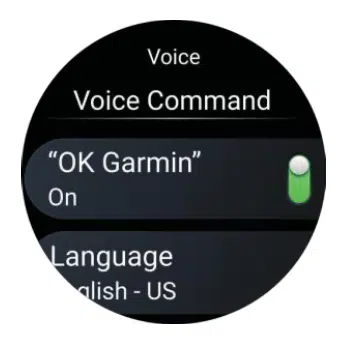
The pattern is fairly consistent. Users are finding that turning off “OK Garmin” restores much of the estimated battery life, sometimes immediately. In certain cases, they have also needed to disable the separate Phone Assistant wake-word setting to return to their previous estimates.

Garmin says reduced battery life is expected
Garmin actually warns about this in its official documentation. Enabling the voice wake word reduces battery life, although the company doesn’t specify how much users should expect to lose.
The explanation is straightforward. The watch needs to monitor its microphone for the wake phrase throughout the day, even when voice commands aren’t being used. That requires additional power compared with activating the feature manually.
What many people don’t realise is that after installing these latest updates, the feature is automatically enabled. So they need to go into the settings to disable if they do not plan to use it.
It’s also worth noting that some Fenix 8 owners have experienced battery problems unrelated to voice activation. Not every complaint following the September firmware updates necessarily has the same cause.
For anyone noticing shorter battery life, disabling “OK Garmin” is a sensible first step. The setting can be found under the watch’s voice settings, and it’s worth checking whether the separate Phone Assistant wake word is also enabled.
Turning off hands-free activation doesn’t remove voice commands. Users can still activate them manually through the watch’s controls, without keeping the microphone listening throughout the day.
That’s probably the better arrangement for anyone who only occasionally uses voice commands. Giving up several days of estimated battery life simply to avoid pressing a button seems like a rather expensive trade-off.
Don’t miss the latest from Gadgets & Wearables
Subscribe to our monthly newsletter and check out our YouTube channel.
You can also follow Gadgets & Wearables on Google News and add us as a preferred source in Google Search.

