

How to use Garmin’s new Battery Manager on Fenix 8 and Enduro 3
Garmin has added a new tool in Beta version 21.12 for its latest Fenix and Tactix lineups, as well as Enduro 3. The Battery Manager offers detailed insight into power consumption and helps forecast how long the device will last based on recent usage.
This update is available for a wide set of models, including Fenix 8 Pro in all sizes and display types (47mm, 51mm, MicroLED), Fenix 8 AMOLED (43mm, 47mm, 51mm), Fenix 8 Solar (47mm and 51mm), Tactix 8 Solar and AMOLED versions, Enduro 3, and Fenix E. Users can find the new feature under a Glance called simply “Battery.”
What the new Battery Glance shows
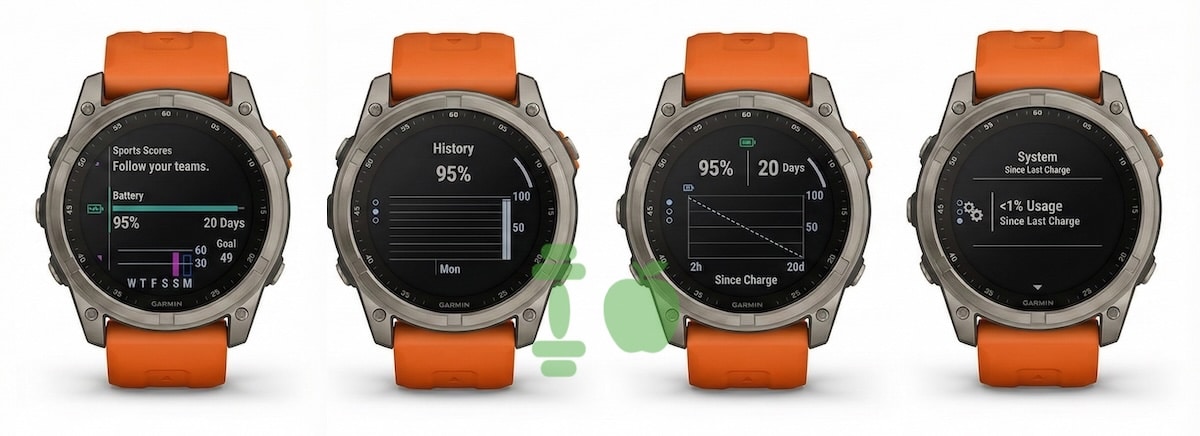
Once added to your widget loop, the Battery Glance opens up a detailed view of usage since the last charge, historical battery drain trends, and real-time projections. Instead of just seeing a percentage or vague bar, you get a proper breakdown of what’s using power and how fast.
It lists everything from GPS, heart rate, display, and sensors, to phone connectivity and accessories, all with their own battery usage percentages. If something is drawing more power than usual, you can catch it instantly. Each item appears on a scrollable list with its contribution displayed as a percentage of the total consumption.
Graphs, forecasts and charging history
The feature does more than show what’s currently draining battery. It also includes a set of graphs showing historical usage over time. You can view how your watch battery dropped across the past several days, how your current drain rate compares to the average, and what you can expect if your usage remains steady.
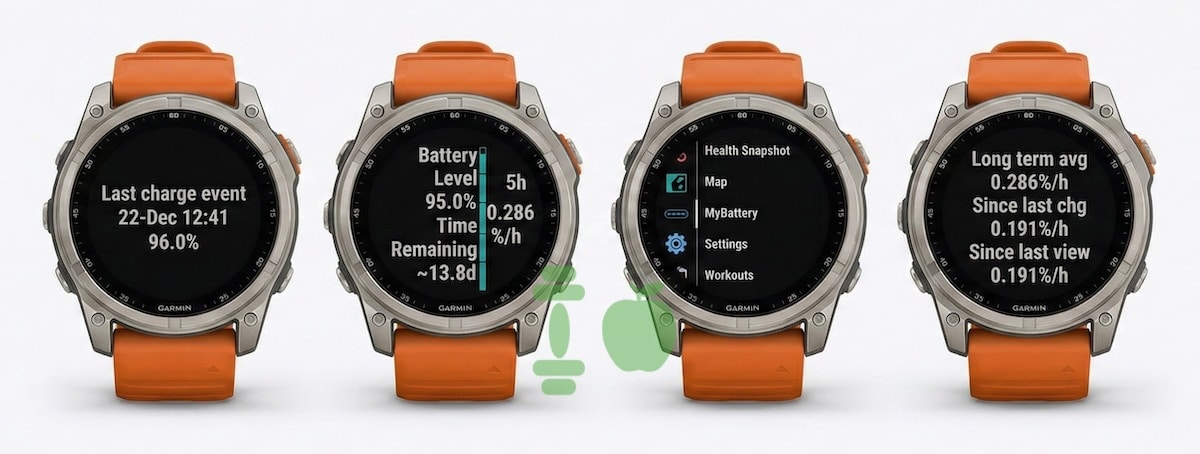
One screen shows your current battery percentage, estimated time remaining in days, and a projected line mapping out depletion. Another tracks historical battery levels day by day, which could be useful for catching patterns or debugging battery issues after a firmware update.
A separate page marks the last time you charged your watch, down to the minute and percentage at that point. This helps users gauge how much time has passed since topping up and how efficient their recent usage has been.
Real-world battery tracking finally arrives
Garmin watches have long had excellent endurance, but until now they relied on rough estimates and one-shot power saving tips. With the new Battery Manager, users can take a much more active role in managing longevity. It’s not just about extending battery life, it’s about understanding it. You can see whether your display settings or GPS profile are having a big impact, and adjust accordingly.
The layout is clean, graphical, and useful. Some screens even show your daily activity overlayed with battery status, linking lifestyle to power draw in a way Garmin hasn’t done before.
This addition makes sense given how many users now expect smartwatch platforms to give them full control over their devices. As mentioned, the feature is part of Beta 21.12. This also brings tools like Sleep Alignment, which help you be more in tune with your circadian rhythm.
It will probably take a month or two before they reach those not registered for Beta. Also, we are yet to learn whether the new Battery tools will roll out to other Garmin watches.
Subscribe to our monthly newsletter! Check out our YouTube channel.
And of course, you can follow Gadgets & Wearables on Google News and add us as your preferred source to get our expert news, reviews, and opinion in your feeds.
